Modular Application Architecture - Events
Modular Application Architecture - Events
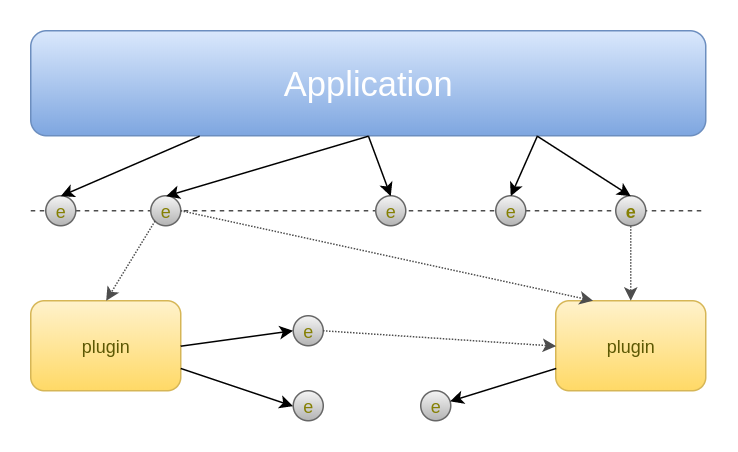
Event Dispatcher
- The application core throws
events. To make the system more flexible and performant events have aname, so event listeners (plugins) can register on specific events without having to listen to each single event thrown by the core. - The events might have a
payload. A payload contains information associated to the event, making it more meaningful. In this way plugins have more info about the context where the event was thrown as just the name could be not enough. - Event listeners can
returnsome data back to who has thrown the event. The returned data should be in a format that can be understood by the who has thrown the event.
Event features
- removing "name": by removing the event name we will make our system more complex and less performant as listeners will have to listen to all the events and decide by themself to react to the event or not. Removing the event name is an uncommon choice and therefore not recommended.
- removing "payload": by removing the payload we make our event less useful as the only info available information for listeners to understand the context of the event is the name. The event listeners will have to find alternative ways to get the context information.
- removing "return": by removing the return we make our event listeners less able to interact with the core application. Effects to the system have to be implemented directly by the plugin using alternative ways. The core application is not able to "use" directly the effects of a plugin. Having return values is common, not having them makes easier to introduce asynchronous events.
- adding "stop event propagation": by giving to event listeners the ability to stop the event propagation (by returning a special value as example), it will be possible to influence the "event" effects thrown by the core on other plugins.
- adding "listener priorities": by adding listener priorities we allow plugins to co-operate better, especially when the "payload" and "stop event propagation" feature is available. It is possible to decide the order of execution of event listeners or to execute only one event listeners even if many are registered on the same event.
- adding "wildcard event listeners": when necessary to listen on multiple events, on all events or on events where the name is only partially known, can be useful to be able to listen on all the events. A common case for this are profiling plugins or debug features.
- adding "ability to throw event": having plugins able to throw events is a useful feature that allows to crete "plugins for plugins" making the whole system more flexible. A drawback of too much flexibility is that can go out of control really easily.
Event listener registration
Example implementations
<?php
use Symfony\Component\EventDispatcher\EventDispatcher;
use Symfony\Component\EventDispatcher\Event;

// the event and payload
class SidebarEvent extends Event
{
    private $placement;
    private $items = [];
    public function __construct($placement)
    {
        $this->placement = $placement;
    }

    public function getPlacement()
    {
        return $this->placement;
    }

    public function addItem(Item $item)
    {
         $this->items[] = $item;
    }

    /**
     * @return Item[]
     */
    public function getItems() : array
    {
        return $this->items;
    }
}


// listeners/plugins
$addContactListener = function (SidebarEvent $ev) {
    $ev->addItem(new Item('Contact on the ' . $ev->getPlacement()));
};
$addHomeListener = function (SidebarEvent $ev, $eventName, EventDispatcher $dispatcher) {
    $ev->addItem(new Item('Homepage' . $ev->getPlacement()));
};

// here is the application
$dispatcher = new EventDispatcher();

// listener registration
$dispatcher->addListener('site_bar', $addContactListener, -100); // priority
$dispatcher->addListener('site_bar', $addHomeListener);

// application throwing events
$dispatcher->dispatch('site_bar', $event = new SidebarEvent('left'));
$items = $event->getItems();

// example use the return values
echo "<li>";
foreach ($items as $item) {
    echo "<ul>" . $item->getTitle() . "</li>";
}
echo "</li>";
- the
$dispatchervariable is the standard symfony event dispatcher; the symfony event dispatcher is synchronous and it allows to listeners to stop the event propagation or to dispatch/throw new events. - we are using a custom
SidebarEventevent that has$placement(that says us where is the sidebar) as payload and allowsdataas return value; setting the return value will stop the event propagation. - our event listeners are
$addContactListenerand$addHomeListeneras simple callbacks. - the event listeners are registered on the
site_barandadmin_site_barevents using theaddListenermethod. - our application throws some events (using the
dispatchmethod); in this case we are using a specific event class (SidebarEvent) and as payload we have the page url. $itemswill contain the values eventually set by an event listener when calling thesetItemsmethod;$itemswill be an an array ofItemas enforced by the type hinting.
<?php

use App\Events\SidebarEvent;

// the event and payload
class SidebarEvent
{
    private $placement;
    public function __construct($placement)
    {
        $this->placement = $placement;
    }

    public function getPlacement()
    {
        return $this->placement;
    }
}

// listeners/plugins
$addContactListener = function (array $payload) {
    list($ev) = $payload;

    return 'Contact on the ' . $ev->getPlacement();
};
$addHomeListener = function ($payload) {
    list($ev) = $payload;

    return 'Homepage on the ' . $ev->getPlacement();
};

// listener registration
Event::listen('site_bar', $addContactListener);
Event::listen('site_bar', $addHomeListener);

// application throwing events
$items = Event::fire('site_bar', [new SidebarEvent('left')]);

// example use the return values
echo "<li>";
foreach ($items as $item) {
    echo "<ul>" . $item . "</li>";
}
echo "</li>";
- the
Eventis the default laravel facade; the laravel event system is also synchronous, has a payload (that by default has to be an array), supports broadcasting, wildcard events and return values. - we are using a custom
SidebarEventevent that has$placementas payload. - our event listeners are
$addContactListenerand$addHomeListeneras simple callbacks. returningfalsewill stop the event propagation. - the event listeners are registered on the
site_barandadmin_site_barevents using theEvent::listenfacade method. - our application throws some events (using the
Event::firefacade method); in this case we are using a specific event class (SidebarEvent) and as payload we have the page url. $returnPageViewwill contain an array with all the not false return values from all the events. since the values inside$returnPageViewcan't be checked by type hinting, a sanity check at application level should be done
<?php

// listeners/plugins
$addContactListener = function ($placement) {
    echo "<ul>Contact on the $placement</li>";
};
$addHomeListener = function ($placement) {
    echo "<ul>Homepage on the $placement</li>";
};

// listener registration
add_action('site_bar', $addContactListener);
add_action('site_bar', $addHomeListener);

// application throwing events

echo "<li>";
$returnPageView = do_action('site_bar', 'left');
echo "</li>";
- we are using the basic action event system from wordpress; supports priorities, payload and return values
- our event listeners are
$addContactListenerand$addHomeListeneras simple callbacks. - the event listeners are registered on the
site_barandadmin_site_barevents using theadd_actionfunction. - our application throws some events (using the
do_actionfacade method); in this case we are using a simple string as payload we have the page url. $returnPageViewwill contain the return value from the last event listener; since the value inside$returnPageViewcan't be checked, a sanity check at application level should be done
Conclusion
- Very flexible.
- High degree of control offered to the application: the application decides extension points and data structures use.
- Can be asynchronous.
- Transparent: the application does not need to be aware of how many plugins are registered and how they are structured.
- Documentable: return and payload can be explicitly defined.
- Limited to pre-defined extension points: there is not an easy way to interact with parts of the application that does not offer appropriate extension points.
- Transparent: since the application is not aware of what plugins do and how many they are, can be difficult to keep application quality; "bad" plugins can't be excluded.
- In some dispatcher implementations is difficult to understand if listeners were triggered
- Hard to debug and almost useless stack traces in case of errors.

Comments
Post a Comment